
Cowork Goes Chargeable: What the 1 July Pricing Change Means for Your Business
If you’ve been using Microsoft Cowork over the past while, you’ll know it has been genuinely useful — and, until now, free. That was thanks to Microsoft’s Frontier program, which gave businesses early access at no cost. From 1 July, that arrangement changes, and Cowork becomes a chargeable service.
Please note: This is written on June 29, 2026 and we expect this landscape to change rapidly as new models emerge and costs shift.
Before anyone reaches for the panic button: this is a manageable change, not a cliff edge. There’s a fair bit of nuance in how the new pricing works, and understanding it now puts you in a strong position to keep costs predictable. This article walks through what’s changing, what it’s likely to cost, and the practical steps you can take to stay in control.
First, the part that’s easy to miss: billing is optional
Here’s the most important point, and it’s one a lot of the noise online tends to skip over. Turning on billing for Cowork is a choice, not an obligation.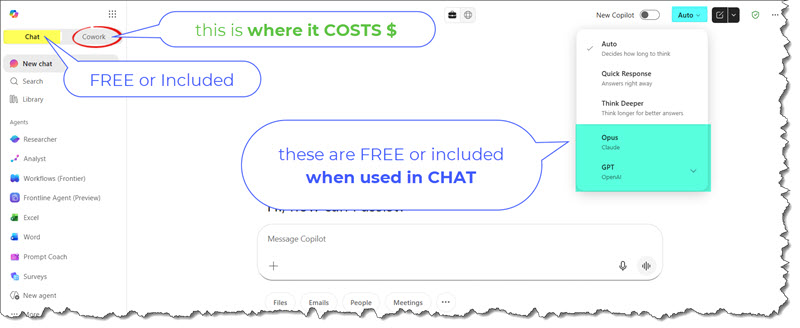
If you decide not to enable billing, you can keep using Copilot Chat and the agents that sit within it without incurring any additional monthly cost. Those capabilities continue as part of your existing Microsoft 365 Copilot entitlements. Billing only comes into play when you choose to switch on the metered Cowork experience — the deeper, multi-step reasoning workloads that consume tokens.
So the first decision isn’t “how much will this cost us?” It’s “do we want to enable the chargeable Cowork experience at all?”
For some teams the answer will be an easy yes. For others, Copilot Chat and agents may already cover the day-to-day. Both are perfectly valid.
Why Cowork is priced differently to “premium tier” AI
It’s worth understanding why Cowork uses a usage-based model rather than a flat monthly fee. A lot of AI tools simply gate their best features behind a higher subscription tier — pay more each month, unlock more features. Cowork works differently because the technology underneath it works differently.
Cowork is a chain-of-reasoning model. Rather than firing back a single quick answer, it works through a problem in steps: planning, gathering, drafting, checking, refining. That’s what makes it capable of handling involved tasks end to end — but it also means a single instruction can quietly consume a lot of tokens behind the scenes. Usage-based pricing reflects that reality more fairly than a flat fee ever could: a light user pays less, a heavy user pays more.
This shift isn’t unique to Microsoft. Across the industry, AI providers are quietly reworking how they charge, moving away from heavily subsidised, all-you-can-eat access toward models that reflect actual consumption. Some commentators have started describing the end of AI’s “Goldilocks period” — that comfortable stretch where capability was high and the price was conveniently low. The economics were always going to catch up. The upside for businesses is that usage-based pricing, handled well, is transparent and controllable. You’re not paying for capacity you don’t use.
Cowork pricing: how the token model works
From 1 July, billing applies to both Cowork and WorkIQ, its companion capability. Both move onto the same usage-based footing on the same date, so it’s worth treating them as one budgeting conversation rather than two.
At a high level, you’re charged for the tokens a task consumes. A token is a small unit of text the model reads and generates, and the number of tokens a task uses depends almost entirely on how much work you’re asking it to do.
Prompt complexity is the main driver of cost. A short, well-scoped request costs very little. A sprawling, open-ended instruction — “research this, cross-check it, draft a report and summarise it three ways” — sets off a much longer chain of reasoning, and the token count climbs accordingly. The clearer and more contained your prompt, the lower the cost. This is one of those rare situations where good habits and lower bills point in exactly the same direction.
Checking the cost of a prompt
Cowork gives you a simple way to see what you’re spending. Typing the /cost command lets you check the token cost associated with a prompt, so there’s no need to guess. For teams getting started, building a habit of glancing at /cost on bigger tasks is one of the quickest ways to develop an instinct for what’s cheap and what’s expensive.
A worked example
Indicative figures are easier to reason about than abstract token counts, so here’s a practical one.
A typical Daily Briefing task — pulling together your calendar, email and messages into a short morning summary — runs at roughly 80 tokens and costs in the order of $0.80 USD, which is about $1.15 AUD at today’s exchange rate (1 USD ≈ 1.45 AUD as of late June 2026).
On its own, that’s loose change. But costs are recurring, so the useful question is what they add up to over a month.
If one person runs that briefing every working day — say 22 working days — that’s around $17.60 USD (roughly $25 AUD) per user per month for that single habit. Add the other things people genuinely use Cowork for — drafting documents, summarising long threads, preparing for meetings, doing first-pass research — and a realistic figure for a moderately active user lands in the region of $50 USD per month (about $72 AUD).
Please treat that $50 as illustrative rather than a quote but also remember this is on top of the Copilot License fee for the user. Actual usage varies widely with how, and how often, people lean on the tool.
Scaling it across a team
Using that moderate figure of roughly $50 USD per active user per month, here’s how it scales assuming every user consumes that much:
- A 5-user team: approximately $250 USD per month, or around $360 AUD.
- A 30-user team: approximately $1,500 USD per month, or around $2,175 AUD.
Two things are worth saying plainly. First, heavy users — people running large research jobs or generating long documents all day — can comfortably run at two to three times the moderate figure, which is exactly why the controls in the next section matter. Second, these numbers assume active, enabled usage. If only a handful of people in a 30-person business actually need the chargeable Cowork experience, you’d only enable and pay for those few.
Also, clearly usage will vary wildly, some will barely touch it while others will use more but for this we are assuming the $50 USD is an average across all AI licensed users.
Once a payment method is in place
Payment methods: how billing is set up
Cowork billing is handled through an Azure subscription. How you get there depends on how you buy your Microsoft licensing.
If you buy Copilot directly from Microsoft, you’ll need two things in place:
- Your own Azure subscription, and
- A company credit card linked to it for token billing.
If that sounds like more plumbing than you’d like to take on, this is something we can help with. Our team can set up the Azure subscription and get billing configured correctly so you’re ready to go without the trial and error. Feel free to reach out.
If you buy through a Cloud Solution Provider (CSP), the path is a little different. CSP customers will need Cowork billing enabled via their CSP provider rather than through a direct Azure arrangement. If that’s you, the simplest next step is a quick conversation with your distributor or reseller to confirm how they’re handling Cowork billing. We’re happy to point you in the right direction if you’re not sure who that is.
Keeping a lid on costs: AI token limits
This is where usage-based pricing turns from a worry into an advantage, because you’re not at the mercy of consumption. The Microsoft Admin Centre gives administrators real control over how many tokens the organisation and its people can use.
There are two main levers:
- Organisation-wide monthly token limits — a ceiling for the whole business, so total spend can’t run past a figure you’ve set.
- Group or user-based token policies — different allowances for different people, based on role and need.
In practice, most businesses tier this. For example:
- Higher limits for leadership and roles that lean heavily on research, analysis and drafting, where the tool earns its keep many times over.
- Lower limits for general staff whose use is lighter and more occasional.
The key point is that this is a business decision, not a technical one. You’re deciding how much value Cowork delivers to each part of your team and budgeting accordingly. Setting sensible limits upfront is the single most effective way to prevent an unexpected cost blowout — the bill simply can’t exceed the boundaries you’ve put in place. It’s the difference between a metered utility you control and an open tap you don’t.
Once a payment method is in place the metrics will start flowing allowing fine tuning of the Payment Policies and their respective limits. Until a payment method is in place these metrics are unavailable.
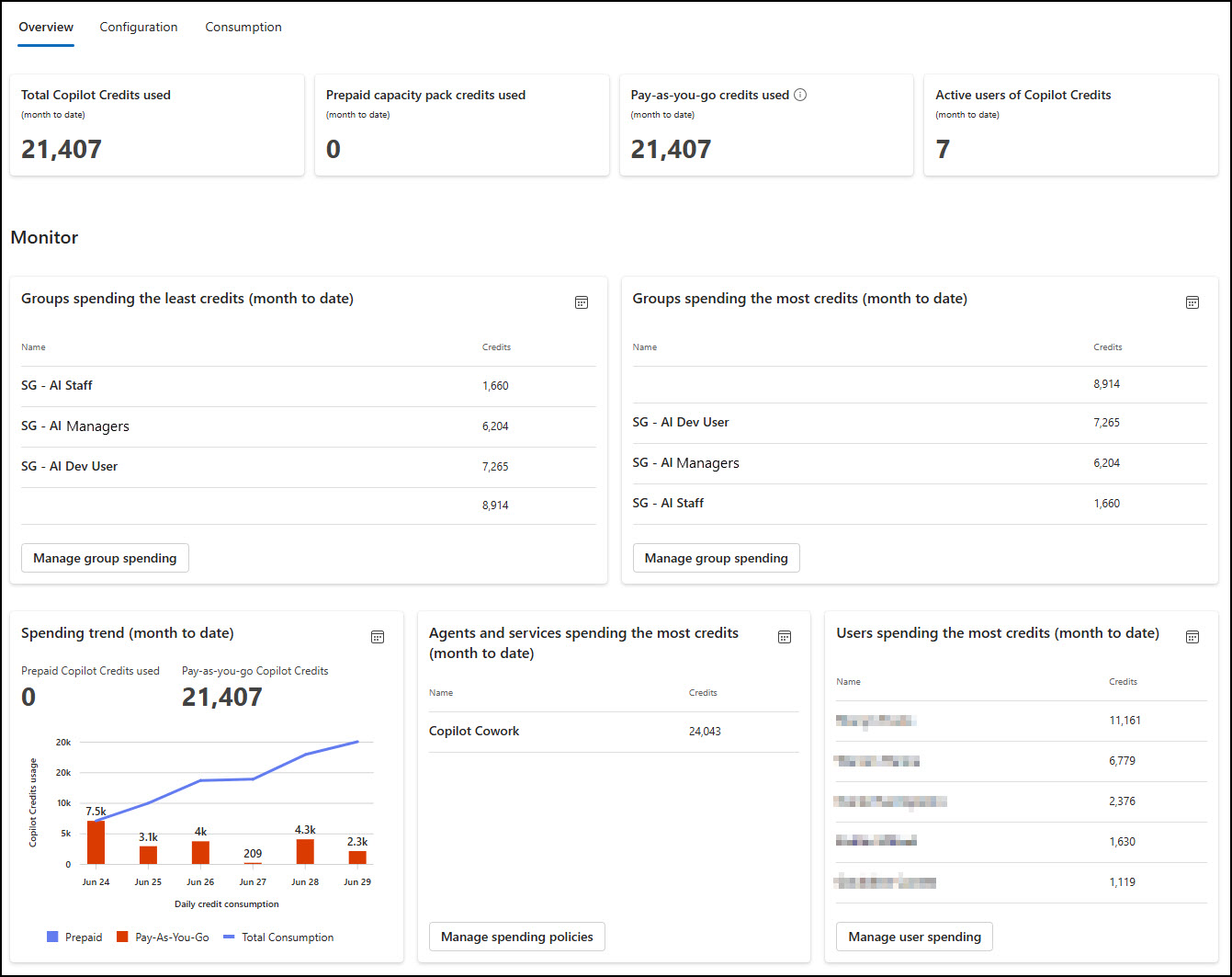
Here’s an example of real world Copilot Cost Management showing spending policies and token use.
AI Cost Management – Overview
This screen provides an overview and launch buttons for quick access to manage certain controls:
AI Cost Management – Configuration
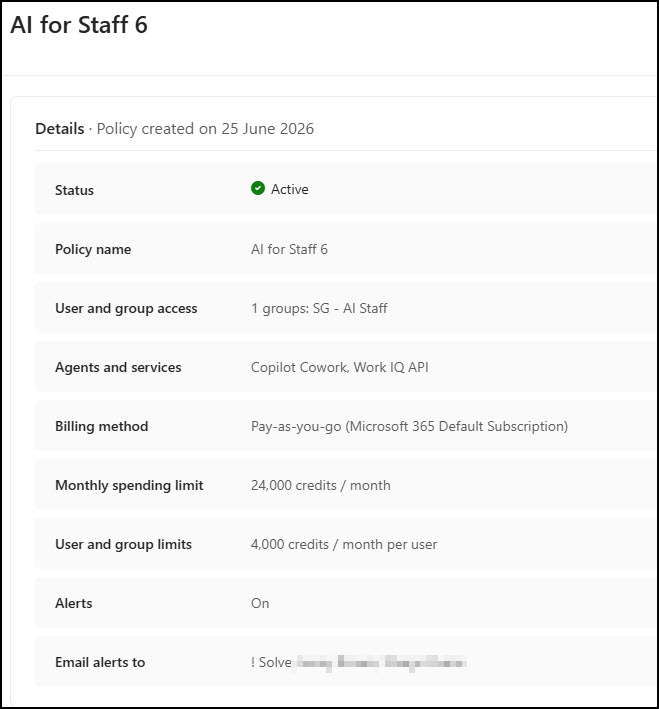
This screen shows the various AI Token spending policies and their respective budgets. Here we have 4 Policies (the default policy is disabled):

Here we are looking at the AI spending policy that is for 6 Staff:
- Notice the user and group limits are set to 4000 for each Member of the “SG – AI Staff” group.
- Alerts are enabled so that admins can be made aware of usage limit issues
AI Cost Management – Consumption
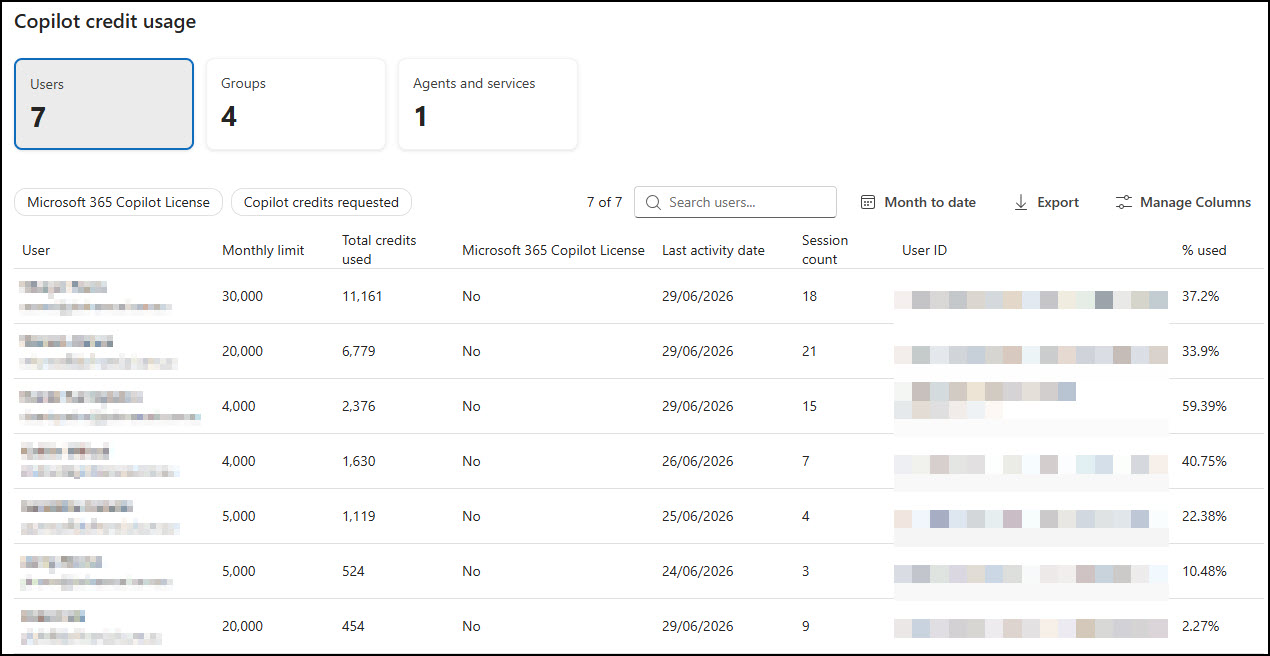
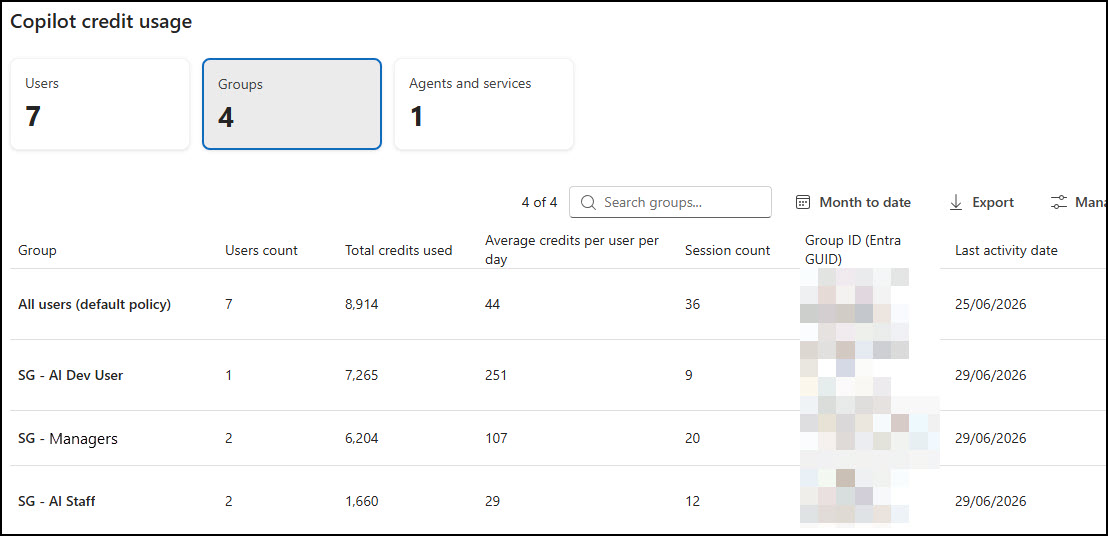
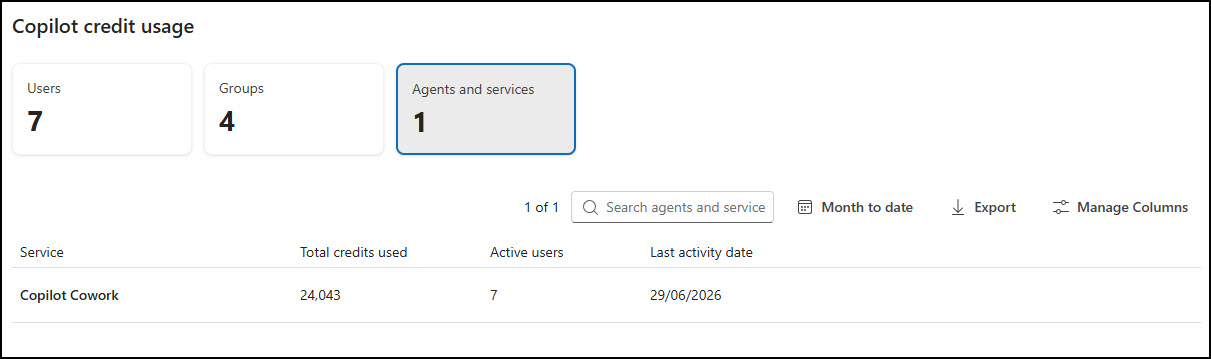
This screen provides an overview of the consumption (per user, per group and per Agent aka Cowork)
In the first screen shot we see consumption by user:
In the first screen shot we see consumption by Group:
In the first screen shot we see consumption by Agent:
New Microsoft models coming soon
It’s also worth looking a little further down the road, because the pricing picture is likely to improve. Microsoft has signalled new in-house models on the way — referred to as MAI and Cowork1 — and the direction of travel is encouraging.
These next-generation models are expected to be more efficient, faster, and potentially lower cost to run than what’s available today. As the underlying technology becomes more efficient, that efficiency tends to flow through to what tasks cost to execute. In other words, the token economics you budget for now may well ease over time rather than tighten.
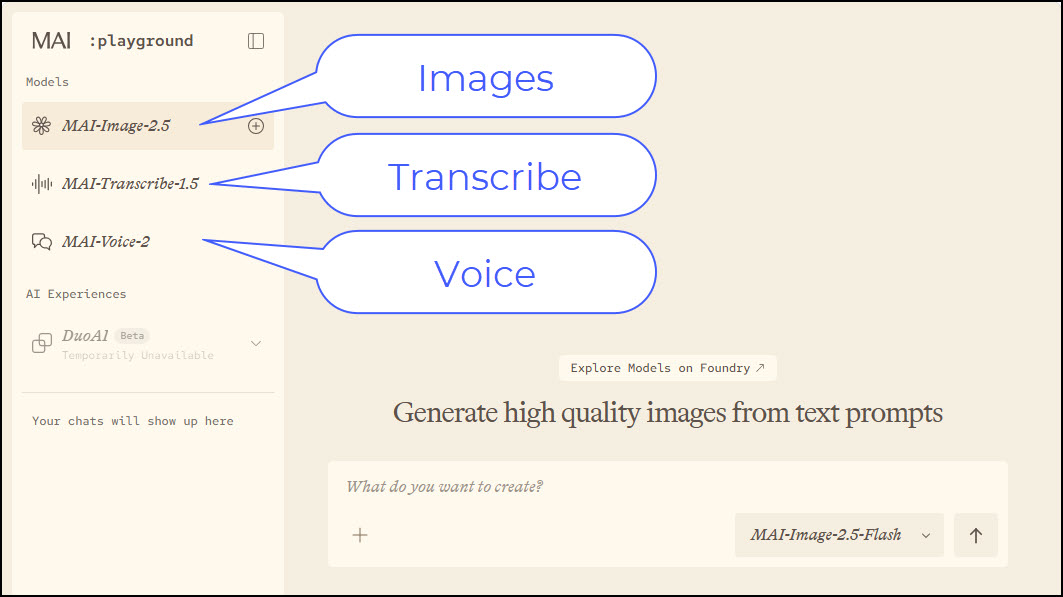
You can get an early look at Microsoft’s MAI models in their MAI Playground
There’s a continuity point here too. Existing Cowork skills are expected to remain broadly compatible with Microsoft’s forthcoming Cowork1 model. So the time you invest now in building useful skills and good working habits shouldn’t be wasted when the new models arrive — it should carry forward.
Project Lobster – coming soon
Project Lobster is emerging as one of Microsoft’s more intriguing internal initiatives, aimed at redefining how AI agents collaborate, coordinate, and deliver outcomes across business workflows. Rather than focusing on a single model or tool, it represents a shift toward orchestrated intelligence—where multiple AI capabilities work together behind the scenes to solve complex tasks with minimal human intervention. For business owners, this signals a future where automation is no longer about isolated processes, but about end-to-end outcomes—reducing manual effort, improving consistency, and ultimately enabling teams to focus on higher‑value work while AI handles the heavy lifting in the background.
DeepSeek – coming soon
DeepSeek’s arrival in the broader Copilot ecosystem highlights a growing shift towards a multi‑model future, where different AI engines are used for what they do best. Known for its strong reasoning capabilities and cost efficiency, DeepSeek brings another layer of intelligence into Copilot experiences—particularly for more complex analysis, coding tasks, and structured problem solving. For businesses, this means Copilot is no longer tied to a single AI “brain,” but can dynamically leverage the most suitable model for the job, improving both performance and value while giving organisations access to more advanced capabilities without needing to manage multiple AI tools themselves.
DeepSeek, was originally developed by a Chinese AI company and gained rapid global attention due to its strong performance and the availability of open-weight models. While elements of DeepSeek are accessible to the broader AI community, it’s not entirely open in every aspect, and organisations like Microsoft are integrating such models alongside others as part of a broader multi‑model strategy. For businesses, the key takeaway isn’t where the model comes from, but how these advances are making AI more capable, cost‑effective, and accessible within platforms like Copilot.
Note: These are forward-looking signals rather than firm release commitments, so it’s sensible to plan around what’s available today while keeping an eye on what’s coming and remember when Microsoft bring AI capabilities to Copilot they do so in a way that respects your Enterprise Data Protection.
Just for interest the image icon above depicting DeepSeek was generated by Microsoft’s MAI-Image-2.5-Flash model. Recently this model was upgraded to MAI-Image-2.5-Pro. I have both images below that are clickable so you can compare the progress (both were created with exactly the same prompt “create a cartoon style image of DeepSeek AI to draw a users bring to associate it with Microsoft’s implementation of DeepSeek AI, make it include a purple whale alongside the current brain, Microsoft logo and AI guy”). You can read more about the progress of the MAI models here.

Created with MAI-Image-2.5-Flash (click for full size)

Created with MAI-Image-2.5-Pro (click for full size)
Practical next steps
You don’t need to do everything at once. A measured approach works best:
- Decide whether to enable billing at all. If Copilot Chat and agents already cover your needs, you can continue using them at no additional monthly cost and revisit Cowork later.
- Identify who actually needs the chargeable experience. It’s rarely everyone. Start with the roles that get the most value from deeper, multi-step work.
- Set token limits before you switch on billing, not after. Put an organisation-wide ceiling in place and tier allowances by role so spend stays predictable from day one.
- Get the
/costhabit going early. Encourage your team to check the cost of larger prompts so they build a feel for what’s worth running. - Sort out the billing plumbing. If you buy directly from Microsoft, you’ll need an Azure subscription and a linked company card. If you’re a CSP customer, talk to your distributor or reseller. Either way, we can help you set it up correctly.
- Keep next-generation models on your radar. With MAI and Cowork1 expected to be faster and more efficient, today’s costs are a starting point, not a permanent ceiling.
If you’d like a hand working through any of this — whether it’s setting up the Azure subscription, configuring token limits, or simply deciding whether billing is right for your business then please get in touch. We’d be glad to help you make the call with clear numbers in front of you.
A note on figures
Cost figures in this article are indicative and intended to illustrate how usage-based pricing behaves, not to serve as a formal quote. Token costs, model availability and billing arrangements are set by Microsoft and may change. Please confirm current pricing with Microsoft or your provider before budgeting. AUD conversions use an approximate rate of 1 USD ≈ 1.45 AUD as at late June 2026.